A Node.js service can look healthy while quietly becoming unresponsive.
The process is still running. The queue is still being drained. CPU usage may not even appear unusually high.
Yet something strange begins to happen:
- HTTP health checks time out;
- new WebSocket connections stop being accepted;
setTimeout()callbacks never fire;- the service appears alive, but it no longer responds properly.
The cause may be hidden in a seemingly harmless line:
process.nextTick();Used carefully, process.nextTick() is useful. Used recursively, however, it can prevent the Node.js event loop from moving forward.
Consider this queue-processing code:
function drainQueue(queue) {
  if (queue.length === 0) return;
  const item = queue.shift();
  processNotification(item);
  process.nextTick(() => drainQueue(queue));
}
At first glance, this appears sensible.
The function removes one notification, processes it, and schedules the next iteration asynchronously.
Because the recursive call is not made directly, it may appear that the application is yielding control back to Node.js.
It is not.
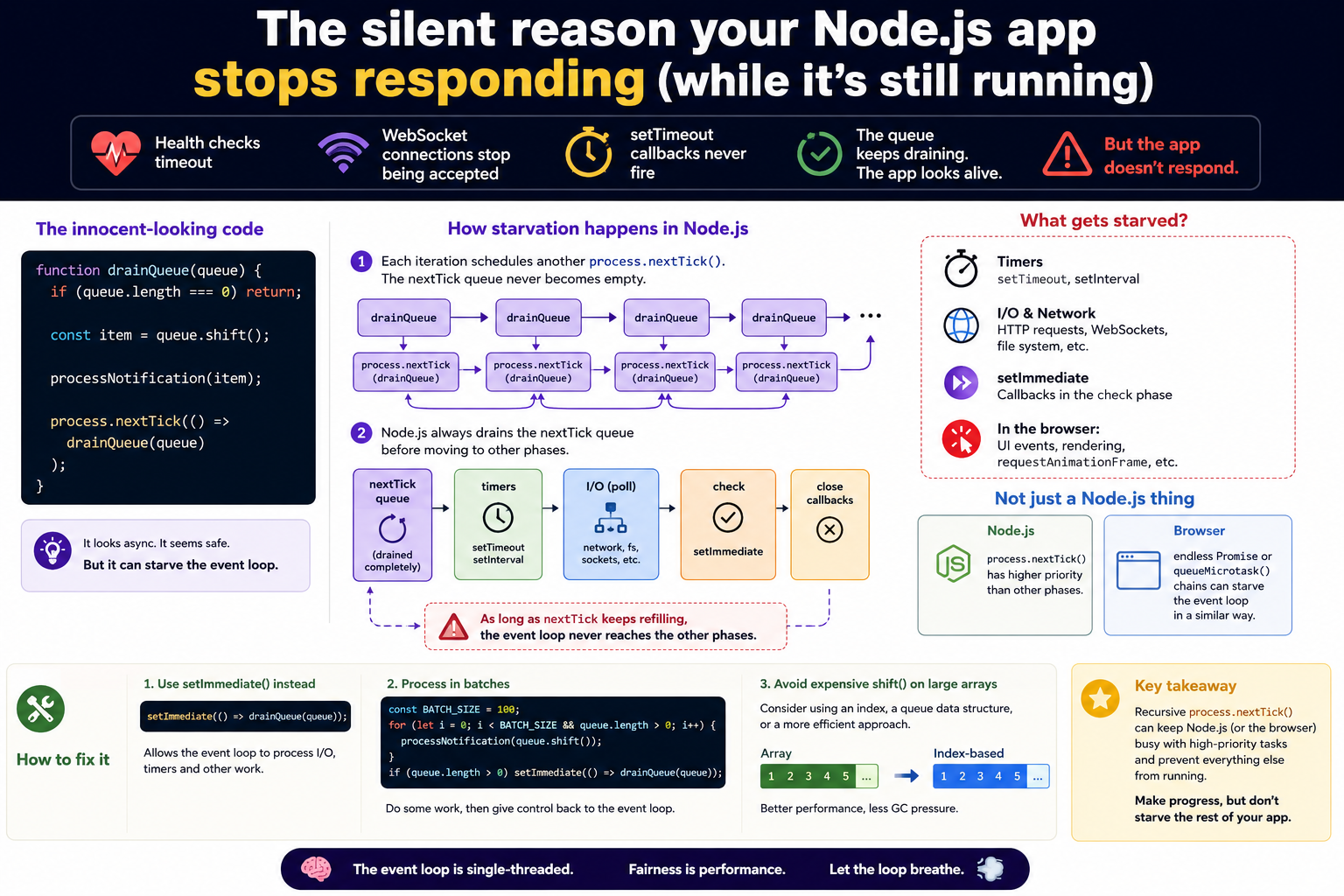
The important detail about process.nextTick()
process.nextTick() does not behave like setTimeout() or setImmediate().
When the current JavaScript operation finishes, Node.js processes callbacks placed in the nextTick queue before allowing the event loop to continue through its normal phases.
Those phases include:
- timers, where
setTimeout()andsetInterval()callbacks run; - poll, where Node.js handles network and filesystem I/O;
- check, where
setImmediate()callbacks run; - close callbacks, where certain resources are closed.
The nextTick queue has particularly high priority.
Node.js drains this queue before continuing with the event loop. Recursive process.nextTick() calls can therefore keep the application inside that queue indefinitely.
In our example, the flow looks like this:
drainQueue()
  ↓
processNotification()
  ↓
process.nextTick(drainQueue)
  ↓
drainQueue()
  ↓
process.nextTick(drainQueue)
  ↓
...
Every callback places another callback into the same high-priority queue.
As long as notifications remain, the queue keeps refilling itself.
The event loop does not get a proper opportunity to move on.
What is event loop starvation?
Event loop starvation happens when one source of work continuously occupies the event loop and prevents other ready work from being processed.
The application is not necessarily dead or crashed.
It is still performing work, but it is unfairly prioritising one category of work so heavily that everything else is left waiting.
Imagine a meeting where one person repeatedly says:
“Just one more thing.”
Every time they finish speaking, they immediately introduce another point before anyone else gets a turn.
The meeting is technically progressing, but nobody else is able to contribute.
That is starvation.
In this Node.js example, the queue consumer continues processing notifications, but HTTP requests, WebSocket connections, timers and other callbacks are never given enough time to run.
Is this a Node.js-only problem?
The specific API shown here, process.nextTick(), is Node.js-specific.
It does not exist in normal browser JavaScript.
However, the broader problem of event loop starvation is not limited to Node.js.
Browsers have their own event loop, task queues and microtask queue. Promise callbacks and callbacks scheduled with queueMicrotask() run as microtasks.
After the current JavaScript task completes, the browser drains the microtask queue before moving to the next task. Microtasks are allowed to schedule more microtasks, and those newly created microtasks are also processed before the browser proceeds.
That means a browser can experience a similar starvation problem:
function keepRunning() {
  queueMicrotask(keepRunning);
}
keepRunning();
setTimeout(() => {
  console.log('This may never run');
}, 0);
Each microtask schedules another microtask.
The browser keeps draining the microtask queue and may never reach the timer callback.
The page may also stop responding to user interaction or fail to repaint because rendering generally needs an opportunity between event loop tasks.
The Node.js version
In Node.js, recursive process.nextTick() can starve:
- timers;
- filesystem and network I/O;
- HTTP request handling;
- WebSocket connections;
setImmediate()callbacks.
The browser version
In a browser, an endless microtask chain can starve:
setTimeout()andsetInterval();- click, keyboard and other UI events;
- network-related task callbacks;
- animation frames;
- screen rendering and visual updates.
So the broader lesson applies to both environments:
High-priority asynchronous work can still block an application if it continuously schedules more high-priority work.
The API is different, but the starvation pattern is very similar.
Does Promise recursion cause the same problem?
Potentially, yes.
Promise callbacks are placed in the microtask queue:
function loop() {
  Promise.resolve().then(loop);
}
loop();
setTimeout(() => {
  console.log('Timer');
}, 0);
This creates a continuously replenished microtask queue.
In a browser, it can prevent the next task and rendering opportunity.
In Node.js, Promise microtasks can also delay other event loop work, although process.nextTick() has its own Node-specific scheduling behaviour and is processed with especially high priority.
For this reason, neither process.nextTick() nor Promise microtasks should be used as an unbounded queue-processing mechanism.
A useful distinction
JavaScript itself does not define networking, timers, the DOM or process.nextTick().
Those features are provided by the runtime environment.
The same JavaScript language can therefore run under different event loop implementations:
| Environment | High-priority mechanism | What may be starved |
|---|---|---|
| Node.js | process.nextTick() and microtasks | I/O, timers, HTTP, WebSockets and setImmediate() |
| Browser | Promise microtasks and queueMicrotask() | timers, user events, rendering and animation frames |
So it is more accurate to say:
Event loop starvation is a runtime scheduling problem, not exclusively a Node.js or browser problem.
The example in this article is Node.js-specific because it uses process.nextTick(), but the underlying concept also exists in browsers.